


Table Of Content
Synthesia is good at the thing it was built to do. The avatars are clean, the voices are clear, it covers 160+ languages, and it renders a presenter reading a script faster than you could book a studio.
The catch is what it was built for. Synthesia is a corporate communications tool. Internal training, onboarding, compliance updates, policy refreshers, the video your L&D team ships to 4,000 employees on Monday. It says so itself: over 90% of the Fortune 100 are customers.
That shows up in the product. The avatars are professional and slightly stiff. They read a script well and they do not perform. They are convincing enough for a room that has to watch the video and not convincing enough for a feed that does not.
Which is the real problem if you are doing marketing. Synthesia is not social-media-first. The Starter plan gives you 120 minutes of video a year, which is a sensible budget for a training library and a strange one for a brand posting three times a week. And it stops at the MP4. It does not find you an angle, it does not cut for a feed, and it does not post anything.
So before you go shopping for a cheaper Synthesia, work out whether you actually want one. If you make internal video for a large company, Synthesia is a reasonable tool and the alternatives below that matter are the ones that beat it on price or on course structure. If you make marketing video, you are in the wrong category, and the tools worth your time look nothing like it.
Here are seven, with pricing verified on each vendor's own page on September 4, 2026, and an honest note on which of them are avatar tools and which are not. If you want the long version on Synthesia itself first, I wrote a full Synthesia review.

The Best Synthesia Alternatives At a Glance
- 1. Zebracat – Best for growing on social media with AI video
- 2. HeyGen – Best for realistic avatar and presenter videos
- 3. Lumen5 – Best for turning written content into video
- 4. Runway – Best for cinematic, generated visuals
- 5. Elai – Best for multilingual training video, now part of Panopto
- 6. D-ID – Best for photo-based avatars and interactive agents
- 7. Colossyan – Best for corporate training and full courses
Synthesia Alternatives Compared
The column that matters most is the third one. Almost every tool here hands you a file and stops. Read across that row before you read the prices.
| Tool | Best for | Where the visuals come from | What happens after the video is made | Starts at |
|---|---|---|---|---|
| Zebracat | Growing on social with video | Realistic UGC-style avatars, animated avatars, AI generation and stock, picked per scene | Schedules and posts to your channels, then learns from the results | Free, then $23/mo billed yearly |
| Synthesia (for reference) | Internal training and corporate comms | Stock avatar on a slide background | You download the MP4 | Free, then $18/mo billed yearly |
| HeyGen | Realistic presenters and avatar cloning | Stock or cloned avatar, plus generated footage | You download the MP4 | Free, then $24/mo billed yearly |
| Lumen5 | Blog posts and internal comms as video | Stock library, no avatars at all | You download the MP4 | Free, then $19/mo billed yearly |
| Runway | Cinematic shots and VFX work | Generated from your prompt, no presenter library | You download the clip and edit it yourself | Free, then $12/mo billed yearly |
| Elai | Multilingual training video | Stock or custom avatar on a slide | You download it, or push it into Panopto | Free, then $23/mo billed yearly |
| D-ID | Animating a photo, and live avatar agents | A still image you upload, animated | You download it, or embed a live agent | 14-day trial, then $4.70/mo billed yearly |
| Colossyan | Training that has to become a course | Stock or custom avatar on a slide | You export SCORM into your LMS | Free, then $27/mo |
Prices verified on each vendor's own pricing page on September 4, 2026. Currency is USD and some vendors show different figures by region.
What Makes the Best Synthesia Alternative?
Start by being fair to it. Synthesia does one job properly. You paste a script, pick an avatar, and get a clean presenter video in any of 160+ languages without a camera, a studio or a person who has to be available on Thursday. For a compliance update that has to go out in eleven markets, that is genuinely useful and there is not much that replaces it.
The trouble starts when you ask it to do the other job.
It is built for the boardroom, not the feed
Look at who Synthesia sells to and the product makes sense. Over 90% of the Fortune 100 are customers. The feature list is SCORM export, SAML single sign-on, brand kits, audit logs, live team collaboration and a dedicated customer success manager. Those are procurement features. They are what a 4,000-person company needs to ship internal video safely, and they are irrelevant to a founder trying to post four Reels a week.
The avatars follow the same logic. They are polished, neutral and slightly stiff. They deliver a line correctly rather than deliver it well, and the mouth movement does not always land. Inside a training module nobody minds. On a feed that is deciding in two seconds whether to keep watching, a slightly-off face is exactly the wrong thing to lead with.
The volume math does not work for marketing
Synthesia moved from minutes to credits in August 2025, so any guide still describing it in video minutes is out of date. Here is what the plans actually give you in 2026.
- Basic, free: 1,200 credits a month, usable for about 10 minutes of video, 1 editor, 9 avatars, and no downloads. It is a trial, not a free plan.
- Starter: 14,500 credits a year, which is 120 minutes of video a year, plus 580 minutes of AI dubbing, 1 editor and 3 guests, 125+ avatars.
- Creator: 44,000 credits a year, which is 360 minutes of video a year, 5 personal avatars, API access and interactive video.
- Enterprise: unlimited minutes, 240+ avatars, SCORM export, SSO and translation into 80+ languages.
One hundred and twenty minutes a year is roughly ten minutes a month. That is a fine budget for a training library that gets refreshed quarterly. It is about eight short-form posts. If you are running a content channel, you will hit the ceiling in week two, and the credits do not roll over.
It stops when the file is finished
This is the one that costs the most and gets discussed the least. Synthesia hands you an MP4. Everything after that is still your job: deciding what to make, cutting it for each platform, writing the captions, posting it, reading what happened and adjusting.
For internal comms that is fine, because the distribution is an email and an LMS. For marketing it is most of the work. A tool that generates the video and stops has automated the easy third of the process.
What Synthesia did add in 2026
To its credit, the product has not stood still. Synthesia 3.0 landed in October 2025 with Express-2 avatars, video agents that can hold a conversation, clickable and branching interactivity, generative B-roll and frame-accurate dubbing. The company raised $200M at a $4B valuation in January 2026. The direction is clearly interactive enterprise video, not social content, which is worth knowing because it tells you where the roadmap is going.
So what should an alternative actually beat it on
Four things, in this order.
- Output that suits the channel. A talking head on a slide is one format. Marketing needs several.
- Volume you can afford. Minutes per year is the wrong unit if you post weekly.
- Something after the export. Scheduling, publishing and a feedback loop, or you are still doing the hard part by hand.
- Avatars only if you need them. Two of the seven here have no avatars at all, and that is deliberate rather than an oversight.
If InVideo is also on your shortlist, we put the two head to head in Synthesia vs InVideo.
Best Synthesia Alternatives I Tried in 2026 (Free & Paid)
1. Zebracat - Best for Growing on Social With AI Video
I put Zebracat first because it is the tool on this list that is built for the job Synthesia is not built for: getting a brand to grow on social with video.
The difference is not that it makes prettier videos. It is that it does not stop when the video is finished.
You give it a topic, a link or a script. It researches what is already working in your niche, builds on the formats that perform there, writes the script, picks the scenes, generates the visuals, adds voiceover, music and captions, and gives you a finished video rather than a clip you still have to assemble. Then it schedules and posts it across your channels, including YouTube, reads what happened, and uses that to inform the next one. It remembers your brand and your taste as it goes.
The avatars are one of the best parts, not an afterthought.
The realistic ones are UGC-style talking avatars, the kind that read as a person filming themselves rather than a presenter standing on a stage, which is the format that actually works in a feed. Alongside those there is a deep set of animated avatars that are genuinely fun to experiment with. All of them can appear across different scenes rather than standing in front of one background, can be kept on brand, and are tuned to perform on social. That is the honest difference from Synthesia's library: the same idea, built for a different room.
All the models, none of the model homework.
The other thing that matters in 2026 is that new video models ship constantly and they are good at different things. Zebracat plugs into the newest ones, usually within days of release, and selects the right model per video and per scene automatically, tuned for the best quality per credit. You never have to learn which model is good at faces and which one is good at motion. That decision is made for you.
Where Synthesia wins.
Be clear about this, because it matters if you are choosing between them. If your video is an internal compliance module that has to sit in an LMS with SCORM tracking and SSO, Synthesia is the better tool and Zebracat is not trying to be. Zebracat is for the videos that go out into the world and have to earn attention.


Zebracat Best Features
- Avatars Built for the Feed – Realistic UGC-style talking avatars, plus a deep set of animated ones, that stay on brand, appear across different scenes, and are optimized to perform on social.
- Publishing and Growth Loop – Schedules and posts across your social channels including YouTube, then learns from what performed.
- Automatic Model Routing – Access to the newest AI video models within days of release, selected per scene automatically for the best quality per credit.
- Niche Research Built In – Finds the formats already working in your niche and builds on them instead of starting from a blank page.
- End to End Generation – Script, scenes, footage, voiceover, music and captions in one pass. Not a clip you then have to edit.
- Agent Flow in Chat – You work with it conversationally instead of driving a timeline, so the AI takes most of the decisions.

Zebracat Limitations
- Not an LMS tool – No SCORM export and no course structure. If your video has to be tracked as training, Colossyan or Synthesia fit better.
- Not a corporate presenter tool – The avatars are built to hold attention in a feed, not to read a twenty-minute policy module to camera. For that shape of video, Synthesia and Colossyan fit better.
- Less manual control – The AI takes a lot of the decisions. That is the point, and it will frustrate you if you want frame-level control.
What About Pricing?
Both monthly and annual rates, so you can see the real difference:
- Free: $0. 5 videos, 720p, up to 30 seconds. Good for seeing whether the output suits your channel.
- Cat Mode: $23/month billed yearly, or $39 monthly. For individuals and small teams posting regularly.
- Super Cat: $59/month billed yearly, or $99 monthly. Adds AI avatars, voice cloning and heavier volume.
- Unlimited Cat: $119/month billed yearly, or $199 monthly. For teams running video as a channel, not a project.
- Enterprise: from $599. Custom volume and support.
Prices verified September 4, 2026.
Worth comparing against Synthesia's Starter plan, which is cheaper per month and caps you at 120 minutes of video a year with no publishing attached.
Try Zebracat free and see what it makes from one prompt. No card needed, and you will know inside ten minutes whether the output belongs on your feed.
What Real Users Say About Zebracat
I honestly love everything about it as it is now. At first, I had my doubts about this tool, even though the reviews were pretty positive, but once I decided to go for it and bought it, I started using it more and more. Now, I just love it! It makes content creation super quick. Sure, there are a few bugs and things that need improvement, but the team responds fast, which gives me hope that it'll be bug-free soon. Really looking forward to more updates! Bottom line, it's a huge help for content creators.
2. HeyGen - The Avatar Video Tool That Looks Real
If you want what Synthesia does but done better, HeyGen is the answer, and it is the most direct swap on this list.
The avatars are noticeably more alive. Facial expression and hand movement land better, and the eyes have less of the flat, dead quality that makes most digital presenters uncomfortable to watch. It is the same category as Synthesia, executed harder.
Cloning is where it pulls ahead. Upload two to five minutes of yourself and you get an avatar that can present anything afterwards without you filming again. For a founder who wants to be the face of the brand without being in front of a camera every week, that is a real answer.
The translation is the other standout. Record once, get versions in other languages with lip movement that matches, in minutes rather than days.
HeyGen has also stopped being purely a talking-head tool. Through 2026 it added Avatar V, integrated cinematic generation and shipped a proper developer API. It is a broader platform than it was when this article was first written.
What it still does not do is anything after the export. You get a very good file, and the posting, scheduling and measuring is yours. Same shape as Synthesia, better avatars.
We also compare the two approaches directly in Zebracat vs HeyGen.

HeyGen Best Features
- Realistic Avatars: a large stock avatar library spanning ethnicities and ages, with lip-sync that holds up better than most of this category
- Custom Avatars: Users can create personalized avatars by uploading a 2-5 minute video of themselves, facilitating consistent branding or the development of a digital persona.
- Diverse Speaker Selection: a wide voice and language range, with control over accent, speed and pitch, plus translation that matches lip movement.
- Studio-Quality Backgrounds: HeyGen provides various templates and settings, enabling users to add custom elements such as fonts, images, shapes, and background music to enhance their videos.
- Teleprompter Feature: The platform includes an AI script-writing assistant that can help accelerate the video creation process, making recording custom avatar videos more straightforward.
HeyGen Limitations
- Limited creative freedom: the platform is built around talking-head video, which restricts visual storytelling.
- Credit burn: the credits model makes heavy months expensive, and higher usage climbs quickly.
- Basic editing: compared with a dedicated editor, the editing tools are shallow.
- Nothing after export: like Synthesia, HeyGen hands you a file and stops. Posting and measuring are yours.
HeyGen Pricing at a Glance
HeyGen moved from a minutes model to credits, so older comparisons will not match what you see today.
- Free: $0. 3 videos per month, 1 seat. Enough to judge the avatar quality, not enough to work with.
- Creator: $29/month, or $24/month billed annually. 600 credits a month, 1 seat, voice cloning and custom avatars.
- Pro: $49/month. 1,000 credits a month, 1 seat.
- Business: $149/month plus $20 per additional seat. 1,500 credits a month, team features.
- Enterprise: custom. 4K export, no duration limits, enterprise security.
Prices verified on heygen.com/pricing, September 4, 2026. The old Team tier at $69 per seat no longer exists.
3. Lumen5 - Turning Written Content Into Video, No Avatar Involved
Lumen5 is on this list precisely because it is not an avatar tool. There is no presenter, no talking head, no avatar library. It is a text-to-video tool that turns written content into stock-footage video with captions and AI voiceover.
That sounds like a mismatch until you notice how many people buy Synthesia and then turn the avatar off. Plenty of teams end up using it as slides with a voiceover, which is exactly what Lumen5 does natively and more cheaply.
It is strongest on repurposing. Paste a blog post, an internal update or a script and it pulls out the key points and pairs them with relevant footage. The AI picks odd visuals often enough that you will want to review every video, but it saves real hours against building the same thing by hand.
It is worth being honest about its limits as a Synthesia alternative. Lumen5 is a marketing and internal comms video maker. It caps videos at 10 minutes on every plan, the AI voiceover allowance is metered per year, and it will not give you a spokesperson. If the reason you were looking at Synthesia is that you specifically need a person on screen, this is not your tool.

Lumen5 Best Features
- The content-to-video AI reads your text and pulls out what matters, rather than just chopping it into cards.
- A very large licensed stock library, with Shutterstock access on the higher tiers.
- Brand kits save your colors, logos and fonts so output stays consistent.
- Automatic sizing for every social format from one project.
- Genuinely simple. This is the tool on the list a non-video person can open and use immediately.
Lumen5 Limitations
- No avatars of any kind, so it is not a like-for-like Synthesia replacement.
- The free plan brands your outro and caps videos at 2 minutes and 5 videos a month.
- The AI sometimes picks visuals that miss the point and need manual replacement.
- AI voiceover and animation minutes are capped per year, not per month, so heavy months eat the allowance fast.
Lumen5 Pricing Breakdown
- Free: $0. 5 videos a month, 720p, 2 minute maximum, Lumen5 branded outro.
- Basic: $19/month billed yearly. Unlimited videos, no branding, 240 AI voice minutes a year, 12 animation minutes a year.
- Starter: $59/month billed yearly. 1080p, 50M+ stock assets, brand kit, 720 AI voice minutes a year, 1 voice clone.
- Pro: $149/month billed yearly. Shutterstock editorial, custom watermarks, 3 workspaces, 2,160 AI voice minutes a year, 3 voice clones.
- Team: custom, billed yearly. SSO, approval workflows, translations, customer success manager.
Prices verified on lumen5.com/pricing, September 4, 2026. The old Professional and Enterprise tiers are now Pro and Team.
4. Runway - AI Video Magic for Creative Types
Runway is the least like Synthesia of anything here, and that is the reason to look at it.
There is no presenter library and no script-to-talking-head workflow. You describe a shot and it generates it. That makes it useless for a compliance module and very good for the three seconds of footage that stops someone scrolling.
It has changed a lot since this article was first written. The brand is now simply Runway at runway.com, the current generation model is Gen-4.5, and the company has pushed into world models with GWM-1 after raising $315M at a $5.3B valuation in February 2026. It is positioning itself as a research company that happens to sell a video tool, not as a marketing product.
Practically, it is a source of shots rather than a source of videos. You generate a clip, then you assemble, caption and post it somewhere else. Treat it as the visuals layer, not the whole workflow.

Runway Best Features
- Text-to-video generation that works, describe a scene and watch it come to life.
- Style transfer tools let you apply artistic styles to your footage.
- The inpainting feature lets you replace or remove objects from videos, like Photoshop but for moving images.
- Clean, professional interface that doesn't overwhelm you with options.
- Regular updates with cutting-edge AI features before other platforms get them.
Runway Limitations
- It's pricier than basic video tools, though worth it for what you get.
- The learning curve is steeper than talking-head generators.
- Generation times can be slow for complex requests.
- High-quality outputs sometimes require multiple attempts and refinement.
Runway Pricing
- Free: $0. 125 one-time credits, enough to try it and no more.
- Standard: $15/month, or $12/month billed annually. 625 credits a month.
- Pro: $35/month, or $28/month billed annually. 2,250 credits a month.
- Max: $95/month, or $76/month billed annually. 9,500 credits a month.
- Enterprise: contact for pricing. Custom credit packages.
Prices verified on runway.com/pricing, September 4, 2026. The old Unlimited tier is now Max and it carries 9,500 credits, not 2,250.
5. Elai - Multilingual Training Video, Now Part of Panopto
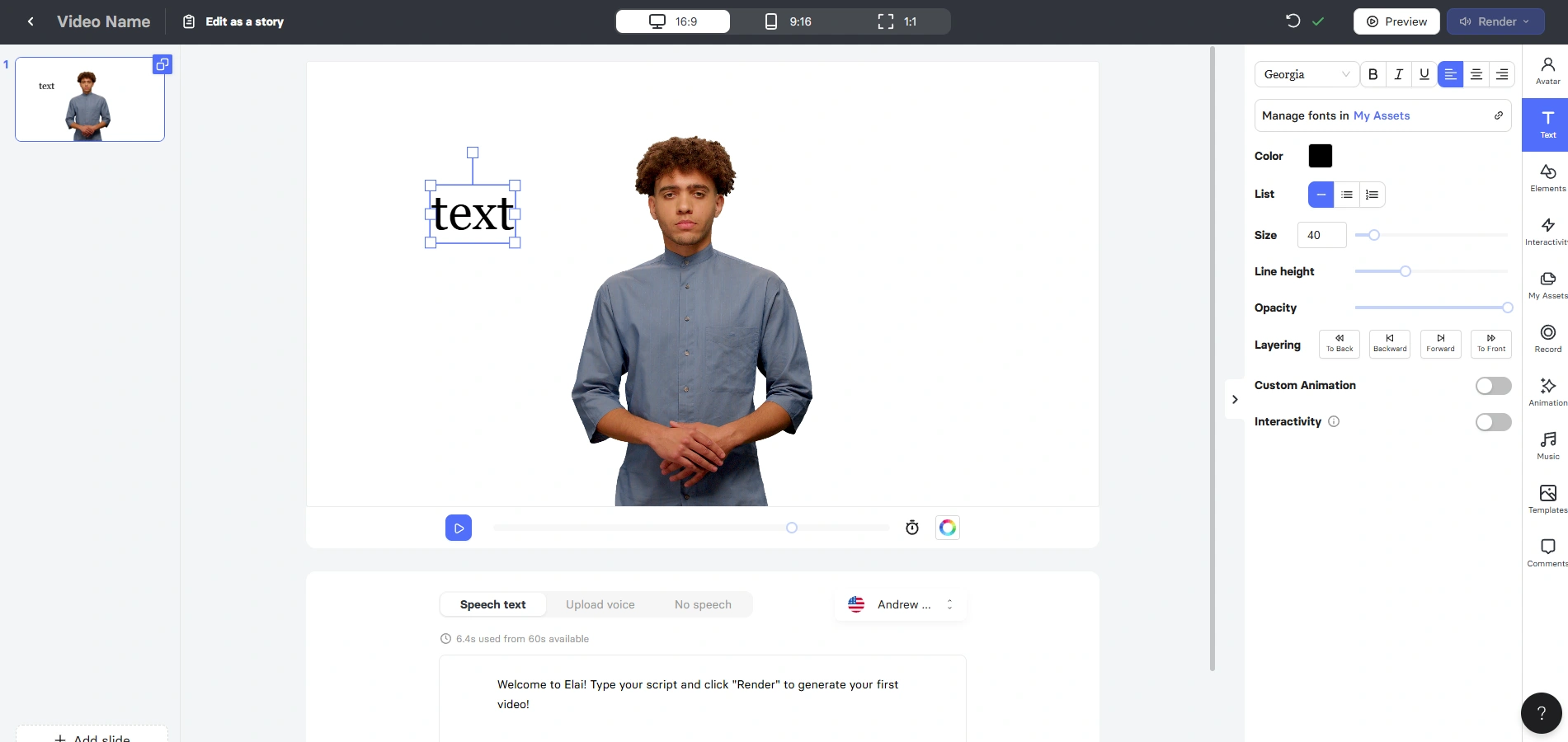
Elai is a straightforward avatar tool built around multilingual training content, and it does that job cleanly. Script in, avatar-narrated video out, in a large number of languages, with a simpler interface than Synthesia's.
One thing to know before you shortlist it: Elai is not an independent product any more. Panopto acquired it in October 2024 and now sells it inside its corporate learning stack as AI Video Studio. The standalone product and self-serve pricing still work exactly as before, but you are buying into Panopto's roadmap, not a startup's.
That is fine if you are an L&D team, and it is worth a pause if you are a marketer, because it points the product further towards the same corporate use case Synthesia already occupies. Elai is a cheaper, simpler Synthesia rather than a different answer.
The multilingual work is where it earns its place. Create once, switch language, and the rest of the video settings carry over. For onboarding content that has to exist in eight markets, that is a lot of saved production.
Elai's Best Features
- A wide multilingual voice range, and the output reads as natural rather than phonetic.
- One-click language switching that maintains all your video settings.
- Custom backgrounds and scene options that work across all language versions.
- Interactive elements like clickable buttons that convert with your video.
- A simplified workflow designed specifically for multilingual content.
Areas for Improvement
- The avatar selection is more limited than some competitors.
- The free plan is quite restricted in terms of video length.
- More advanced editing features require the premium plan.
- The interface can feel too simplified for power users.
Elai Pricing
- Free: $0. 1 minute of video a month.
- Creator: $29/month, or $23/month billed annually. 15 minutes a month.
- Team: $125/month, or $100/month billed annually. 50 minutes a month, 3 editors and 3 guests.
- Enterprise: custom. Unlimited minutes and users.
- Add-ons: selfie avatar $199/year, voice cloning $200/year, studio avatar $500/year.
Prices verified on elai.io/pricing, September 4, 2026. The old Pro and Premium tiers are now Creator and Team, and Team costs substantially more than the $59 Premium plan it replaced.
6. D-ID - When You Need Avatars That Don't Look AI-Generated
D-ID does one thing no other tool here does properly: it animates a still photograph into a talking presenter. Upload one image, with permission, and you get a face that speaks with reasonable expression and accurate lip sync.
For brands that is genuinely useful. You can turn your actual founder, spokesperson or team member into a presenter from a single photo, without them filming anything, and the result reads as more authentic than a stock avatar because it is a real person.
The company has moved on, though, and you should know where it is heading. D-ID acquired simpleshow in late 2025 and spent 2026 pushing into interactive digital humans and visual AI agents: avatars that hold a live conversation on a website rather than read a script into a file. Its Agentic Videos product is the center of the pitch now.
That makes it a weaker like-for-like Synthesia swap than it was a year ago and a stronger pick if what you actually want is an avatar that talks back to your customers.

D-ID Best Features
- Photo animation technology that brings still images to life with remarkable realism.
- Custom avatars created from a single photo, no video recording required.
- Precise lip synchronization that matches complex speech patterns.
- Emotional controls that add natural expressions and gestures.
- API access for developers to integrate these capabilities into their own applications.
D-ID Limitations
- Higher cost for premium features compared to basic avatar tools.
- Limited template and background options unless you bring your own.
- Free tier is quite restrictive compared to competitors.
- Creating truly natural animations sometimes requires trial and error.
D-ID Pricing
- Trial: $0. 14 days, 3 minutes across video, agents and translate, full-screen watermark.
- Lite: $4.70/month, $56 billed annually. 10 minutes a month, D-ID watermark.
- Pro: $16/month, $191 billed annually. 15 minutes a month, 3 personal avatars, 1 voice clone, premium voices, commercial license.
- Advanced: $108/month, $1,293 billed annually. 100 minutes a month, 5 personal avatars, 3 voice clones, custom logo.
- Enterprise: custom. Unlimited video minutes, professional voice cloning, enterprise security.
Prices verified on d-id.com/pricing, September 4, 2026. Note the trial is now 3 minutes over 14 days, not 5.
7. Colossyan - Training Video That Becomes a Full Course
Colossyan is the tool on this list that competes with Synthesia most directly on its own ground, and in 2026 it has arguably overtaken it there.
The reason is that it stopped being a video generator. Colossyan now turns documents, PDFs, decks and URLs into full courses: video, plus quizzes, branching scenarios, SCORM export and engagement analytics, with an AI agent called Cora doing the assembly. Synthesia gives you a video that you then have to build a course around. Colossyan gives you the course.
If you are an L&D team evaluating Synthesia, this is the one to trial against it. The avatars are comparable, the LMS integration is deeper, and the output is the thing you actually needed.
If you are a marketer, none of that helps you. Everything that makes Colossyan good makes it further from social content, not closer.

Colossyan Best Features
- Industry-specific avatars that look appropriate in professional training contexts.
- An AI agent, Cora, that turns documents, PDFs, decks and URLs into a structured course.
- SCORM compliance and LMS integration that learning professionals need.
- Quizzes, branching scenarios and engagement analytics, so the output is a course rather than a video.
- Enterprise-grade security that meets corporate compliance requirements.
Colossyan Limitations
- Two separate avatar engines, NEO and the premium NEO2, are metered as separate quotas, so a headline minutes figure is misleading. On Professional, only 10 of the 30 monthly minutes are premium-engine minutes.
- Creative options are narrow compared to marketing-focused tools.
- Extra premium minutes and studio avatars are expensive add-ons, at $1,500 and $1,000 a year.
- The interface prioritizes function over anything else. It is a training tool and it looks like one.
Colossyan Pricing
- Starter: free tier available, paid from $27/month. 20 NEO minutes and 0.5 NEO2 minutes a month, 15 custom avatars, 1 editor.
- Professional: $59/month billed annually. 30 NEO minutes and 10 NEO2 minutes a month, 20 custom avatars, up to 3 editors, additional members $30/month.
- Enterprise: custom. Unlimited NEO minutes, unlimited custom avatars, unlimited SCORM export, dedicated CSM.
- Add-ons: 600 extra NEO2 minutes $1,500/year, studio custom avatars $1,000/year.
Prices verified on colossyan.com/pricing, September 4, 2026. The old Business tier at $70 no longer exists.
How I've Compiled the List?
Most alternatives lists are written from other alternatives lists. Here is exactly what went into this one, so you can judge how much to trust it.
- Every price was checked on the vendor's own pricing page on September 4, 2026, not taken from a comparison site. Third-party figures for these tools are wrong in almost every direction, and several of them contradict each other by a factor of four.
- Every tool was checked for whether it still exists in the shape the article describes. That is how we caught that Elai now belongs to Panopto, that Runway has moved to a new domain and a new model generation, and that HeyGen and Synthesia both switched from minutes to credits.
- We read whole community threads rather than snippets. Recent discussion in learning and development communities is where the honest reporting on these tools lives, and it is where the pattern of teams buying an avatar tool and then not using the avatar came from.
- We separated avatar tools from everything else. Two of the seven here, Lumen5 and Runway, have no avatars at all. That is on purpose, and each entry says so plainly rather than pretending everything is interchangeable.
- Zebracat is our product and it is first on the list. You should weight that accordingly. The claims made about it are specific and checkable, and the free plan exists so you can check them without paying us anything.
What this list does not include is a scored benchmark of output quality across all seven tools. Quality claims that specific need a controlled test, and when we run one we will publish the method with it.
Synthesia Alternatives: Frequently Asked Questions
What is the best Synthesia alternative in 2026?
It depends on which half of the market you are in, and the split is clean. If you make internal training video, Colossyan is the strongest alternative, because it produces a full course with quizzes and SCORM export rather than a video you then build a course around. If you want better avatars doing the same job, HeyGen. If you make marketing and social video, none of the avatar tools are the answer and Zebracat is, because it generates the video and then schedules, posts and learns from it.
Is there a free Synthesia alternative?
Yes, several, but read the caps. Synthesia's own free plan gives you about 10 minutes of video a month and will not let you download it, so it is a trial rather than a free tier. HeyGen's free plan is 3 videos a month. Lumen5 gives you 5 videos a month at 720p with a branded outro and a 2-minute limit. Runway gives you 125 one-time credits. Zebracat's free plan is 5 videos at 720p up to 30 seconds. Elai gives you 1 minute a month. For genuinely free ongoing use, Lumen5 and Zebracat are the most usable of these.
Who are Synthesia's main competitors?
In the avatar category, HeyGen, Colossyan, D-ID, Elai and Zebracat. HeyGen is the closest head-to-head competitor and generally has the more convincing corporate presenters. Colossyan competes hardest on corporate training. Zebracat competes with realistic UGC-style talking avatars plus a large animated set, built to perform in a social feed rather than in a training module. Lumen5 and Runway compete for the same budget with no avatars at all.
How much does Synthesia cost in 2026?
The free Basic plan is $0 with about 10 minutes of video a month and no downloads. Starter is $29 a month, or $18 a month billed yearly, and includes 120 minutes of video a year. Creator is $89 a month with 360 minutes a year, API access and interactive video. Enterprise is custom with unlimited minutes. Synthesia switched from minutes to credits in August 2025 at 120 credits per minute, credits do not roll over, and a custom Studio Avatar is a $1,000 a year add-on. Prices verified September 4, 2026. Full breakdown in our Synthesia review.
Is anything actually better than Synthesia?
For its own use case, corporate and internal video, Synthesia is hard to beat on languages and enterprise features, and Colossyan is the one tool that genuinely improves on it by producing courses rather than videos. For avatar quality specifically, HeyGen is better. For marketing video, almost anything built for that purpose beats it, because Synthesia is not designed to make content that has to compete for attention in a feed.
What apps are like Synthesia?
HeyGen, Colossyan, Elai and D-ID are the closest in shape: you write a script, pick an avatar, and get a presenter video. Zebracat does avatars too, including realistic UGC-style talking ones and a large animated set, but wraps them in a full workflow that builds the whole video and then publishes it. Beyond that, Lumen5 makes stock-footage video from written content with no avatar, and Runway generates cinematic shots from prompts. All of them solve the same underlying problem, making video without filming, in a different way.
Why do people switch away from Synthesia?
Three reasons come up repeatedly. The avatars read as stiff, which is tolerable in a training module and costly in a marketing video. The volume allowance suits a training library rather than a content channel, at 120 minutes a year on the Starter plan with no credit rollover. And it stops at the export, so scheduling, posting and measuring stay manual. A number of teams also report buying it and then switching the avatar off, using it as slides with a voiceover.
Can I use Synthesia for social media marketing?
You can, and the results usually underperform. The format it produces well is a presenter on a plain background, which is the wrong shape for short-form feeds, and the avatar's slight stiffness is most visible in exactly the first two seconds that decide whether someone keeps watching. The volume limits also work against posting regularly. If social is the goal, use a tool built for it.
The Bottom Line
Synthesia is a good corporate video tool being asked, by a lot of people, to be a marketing tool. It is not one, and no amount of shopping around inside the avatar category will fix that.
So pick by what you are actually making.
- Internal training that has to live in an LMS: Colossyan, and try it against Synthesia directly. It gives you the course, not just the video.
- A better avatar, same job: HeyGen. More convincing presenters, better cloning, better translation.
- Multilingual training on a budget: Elai, with the Panopto ownership in mind.
- A real person's face from one photo, or a live avatar agent: D-ID.
- Written content into video, no presenter needed: Lumen5.
- Cinematic shots to cut into something else: Runway.
- Growing a brand on social with video: Zebracat. Realistic UGC-style avatars when you want a face, and the only tool here that keeps going after the export, which is where most of the work actually is.
If you are in that last group, the honest test takes ten minutes. Give Zebracat a topic, look at what comes back, and decide whether it belongs on your feed.

Hey there, I’m Jenny. I’ve been in marketing for almost 10 years, and I love marketing tech, AI, and automation. I’ve built several YouTube and TikTok channels—some hits, some misses. I joined Zebracat after being a user myself, ready to share my learnings with the world!
Create videos 10x faster and easier with Zebracat
Try it now
Comments